
Docs Commands
Commands for searching and reading B2C Commerce documentation spanning multiple corpora: Script API reference (dw.* classes/modules), Developer Center guides (conceptual/how-to content across Commerce API, PWA Kit, SFRA, and more), Salesforce Help (administration and merchandising content from help.salesforce.com), tooling documentation (this project's own guides), the standard (system) job step catalog, and bundled XSD schemas. Download fresh Script API documentation from an instance.
Use these commands for any B2C Commerce developer or administrator question that is not already grounded in your project context — from Script API method lookups to SCAPI integration patterns, job step parameters, storefront framework guides, Business Manager administration, and authentication flows.
The corpus searched by docs search / docs read includes:
- Script API reference —
dw.*classes/modules for server-side scripting (category:script-api). Content is read online from developer.salesforce.com (cached locally after first read); the search index is bundled. - Developer Center guides — conceptual and how-to content from B2C Commerce Developer Center, organized into categories:
commerce-api,pwa-kit-managed-runtime,sfnext,sfra,b2c-commerce, andcommerce-solutions(bot management, caching strategies, flash-sale traffic, and industry solutions) - OCAPI reference — Open Commerce API usage, hooks, settings, and best practices from B2C Commerce Developer Center (category:
ocapi, e.g.ocapi/ocapisettings) - Salesforce Help — administration and merchandising documentation from help.salesforce.com, split into two categories:
help-admin(import/export, jobs, replication, security, Account Manager, permissions, logs, inventory ops) andhelp-merchant(catalogs, products, promotions, search, content, analytics, SEO). Each entry'surllinks the live Help article; content is read from the raw markdown source. - Salesforce Help Knowledge Articles — public, published B2C Commerce knowledge articles from help.salesforce.com (troubleshooting, how-to, and known-behavior answers), keyed by article number (category:
help-kb, e.g.help-kb/002772125). Images from the original articles are omitted; follow the entry'surlto view them. - Tooling guides — documentation for this CLI, MCP server, SDK, and VS Code extension (category:
tooling) - Standard job steps — built-in job step type IDs (for example
ImportCatalog,ExportCatalog,ImportInventoryLists) that you add to Business Manager job flows (category:job-step). Read the catalog overview withb2c docs read job-steps, or a specific step withb2c docs read <TypeID>. See theb2c-cli:b2c-jobandb2c:b2c-custom-job-stepsskills for how standard steps fit into job flows. - XSD schemas — import/export data format definitions
Search results include category, summary, keywords, url, and sourceUrl fields to help triage matches before reading full content. Each documentation entry with a public page carries both url (the .html page for browser viewing) and sourceUrl (the raw .md source). Developer Center guides carry relatedEntries for their immediate parent and child pages in the published TOC. Salesforce Help landing articles use the same field for child articles shown on the Help page, and generated Help Markdown includes those links under Related Content. Content for online corpora (Script API, Developer Center guides, Salesforce Help) is fetched from the sourceUrl on docs read and cached locally; if a fetch fails, the command falls back to the indexed summary + headings and prints both URLs so you can retrieve the page yourself. Standard job steps are the one corpus whose content ships bundled (they have no public page).
Authentication
| Operation | Auth Required |
|---|---|
docs search | None (uses the local bundled index) |
docs read | None (bundled job steps + online fetch for Script API, guides, and Help) |
docs schema | None (uses local bundled schemas) |
docs download | Instance + WebDAV credentials |
For b2c docs download, configure instance and WebDAV access:
export SFCC_SERVER=my-sandbox.demandware.net
export SFCC_USERNAME=your-username
export SFCC_PASSWORD=your-password
In addition to these topic-specific options, all commands also support global flags.
b2c docs search
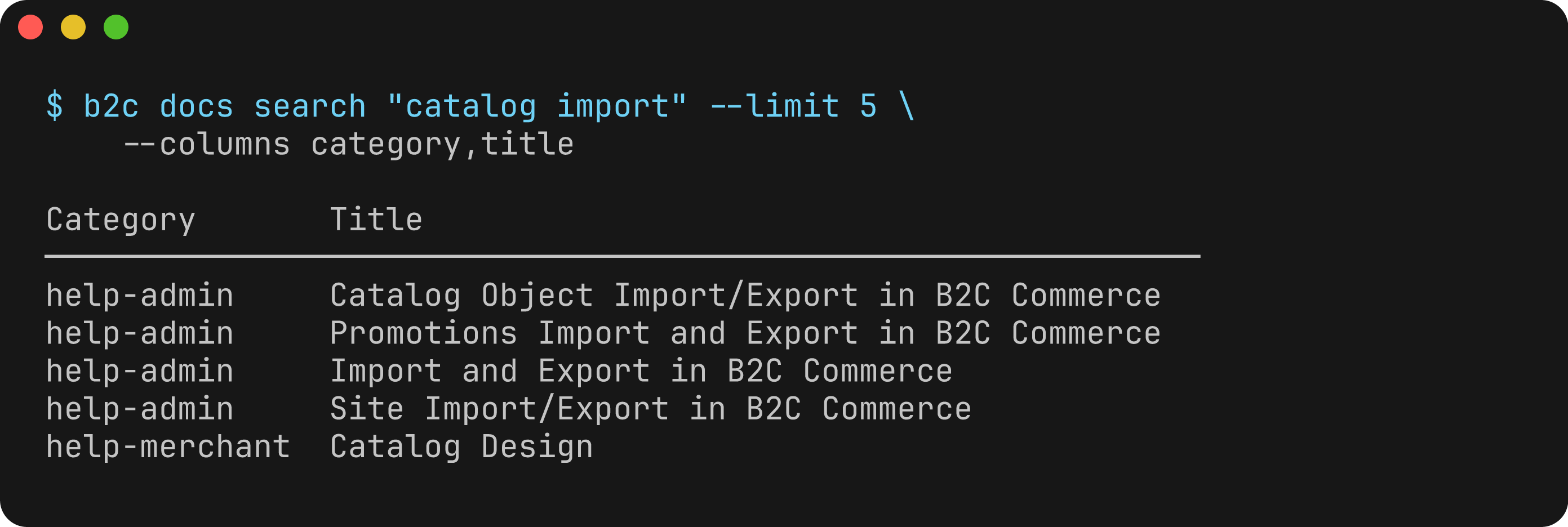
Search documentation across all corpora using content-aware BM25-style ranking. Results include metadata (category, summary, keywords, url) to help triage matches. Search results are paginated by ranked position.
Usage
b2c docs search [query]Arguments
| Argument | Description | Required |
|---|---|---|
query | Search query (keywords, class name, or topic) | No (required unless --list is used) |
Flags
| Flag | Description | Default |
|---|---|---|
--limit, -l | Maximum number of results to display | 20 |
--offset, -o | Number of ranked results to skip (for pagination) | 0 |
--category, -c | Filter by category: script-api, commerce-api, pwa-kit-managed-runtime, sfnext, sfra, b2c-commerce, commerce-solutions, ocapi, tooling, job-step, help-admin, help-merchant, help-kb | (none) |
--workspace | Workspace awareness: auto (default, auto-detects project type), all (disable), or specify one or more types comma-separated: cartridges, sfra, pwa-kit-v3, storefront-next. Boosts relevant categories and de-boosts competing storefront frameworks | auto |
--topics | Allowlist that bounds the whole corpus to these categories (comma-separated; env SFCC_DOCS_TOPICS). --category/--workspace narrow within it; unknown names are ignored with a warning | (all) |
--list | List all available documentation entries | false |
--columns | Columns to display (comma-separated). Available: id, title, category, summary, keywords, url, sourceUrl, score | id, category, title, score |
--extended, -x | Show all columns including extended fields | false |
Examples
# Search across all documentation
b2c docs search "passwordless login"

# Filter by category for targeted results
b2c docs search "passwordless login" --category commerce-api

# Search Developer Center guides
b2c docs search "storefront components" --category sfra

# Search Script API reference
b2c docs search ProductMgr --category script-api

# Search PWA Kit / MRT documentation
b2c docs search "deploy bundle" --category pwa-kit-managed-runtime

# Search Salesforce Help administration content (import/export, jobs, security, ...)
b2c docs search "site import export" --category help-admin

# Search Salesforce Help merchandising content (catalogs, promotions, search, ...)
b2c docs search "price book assignment" --category help-merchant

# Search Salesforce Help Knowledge Articles (troubleshooting, known issues, how-to)
b2c docs search "code upload certificate hyperforce" --category help-kb

# Find a standard job step by name
b2c docs search ImportCatalog

# Limit result count
b2c docs search authentication --limit 5

# Read the next page of ranked results
b2c docs search authentication --limit 5 --offset 5

# List all available entries
b2c docs search --list

# List entries in a specific category
b2c docs search --list --category tooling

# List with workspace awareness — note that --list does NOT auto-detect; it narrows only when --workspace is specified
b2c docs search --list --workspace sfra

# Workspace awareness is ON by default — search auto-detects the project type
b2c docs search "components"

# Opt out of workspace awareness entirely
b2c docs search "components" --workspace all

# Force auto-detection explicitly
b2c docs search "hooks" --workspace auto

# Search with specific workspace types (boosts relevant docs)
b2c docs search "checkout flow" --workspace sfra

# Search for multiple workspace types (union of their boost categories)
b2c docs search "api integration" --workspace cartridges,pwa-kit-v3

# Bound the whole corpus to specific topics (an allowlist, not a per-query filter)
b2c docs search "login" --topics sfnext,commerce-api

# Or pin it via the environment (applies to every docs search/read in the shell)
export SFCC_DOCS_TOPICS=sfra,commerce-api,script-api,tooling
b2c docs search "checkout"
Search is content-aware — it indexes titles, section headings, summaries, and keywords. Developer Center guides have LLM-generated summaries and keywords for improved discoverability.
Restricting available topics (--topics)
--topics (or the SFCC_DOCS_TOPICS env var) is a launch-time allowlist that bounds the entire available corpus — distinct from the per-query --category filter and the soft --workspace boost. When set, only those categories are ever reachable; --category and --workspace narrow within the allowlist (their intersection wins), and docs read will not resolve an id outside it. Unknown category names are ignored with a warning. Use it to pin the docs surface to exactly the topics relevant to your project (for example, an SFRA team can drop PWA Kit and Storefront Next guides entirely). The equivalent for the MCP server is the --docs-topics startup flag.
Workspace-Aware Search
Workspace-aware search favors documentation relevant to your project type, and is on by default — docs search auto-detects the workspace framework unless you say otherwise:
- Auto-detection (default, or
--workspace auto): Detects the project type from the workspace structure and boosts relevant documentation categories - Framework-specific: Specify one or more workspace types comma-separated:
cartridges,sfra,pwa-kit-v3, orstorefront-next. Multiple types union their boost categories (never sum scores) - Disable awareness: Use
--workspace allto search without any workspace preference
Category boost mapping:
- Always relevant (any workspace):
b2c-commerce,tooling cartridges→script-api,job-stepsfra→sfrapwa-kit-v3→pwa-kit-managed-runtime,commerce-apistorefront-next→sfnext,commerce-api
SFRA vs cartridges distinction: A SFRA project is detected as both cartridges and sfra (SFRA is a refinement — it has the app_storefront_base cartridge). A cartridge project that is not SFRA (custom API cartridges, or a PWA Kit / Storefront Next repo that also ships cartridges) is cartridges only — so it will not boost sfra docs.
A detected or specified workspace always boosts relevant docs (ranks them higher) but never hides categories. To hard-scope results to a category, use --category or --topics.
Workspace awareness never filters or hides categories — it only reweights results by applying a x1.4 boost to relevant categories and a x0.3 de-boost to competing storefront frameworks (sfra, pwa-kit-managed-runtime, sfnext that are not the detected/specified workspace).
Output
Default output is a table with id, category, title, and score columns. Use --extended or --columns to show summary, keywords, url, and sourceUrl fields. With --list, output shows all entries with their metadata plus a total count.
b2c docs read
Read documentation for a specific entry. For online corpora (Script API, Developer Center guides, and Salesforce Help), content is fetched from the raw markdown source and cached locally after the first read (with a graceful offline fallback showing summary + headings + both URLs if the network fetch fails). Standard job steps are read from the bundled copy.
Usage
b2c docs read <query>Arguments
| Argument | Description | Required |
|---|---|---|
query | Entry ID, class/module name, or search query to match | Yes |
Flags
| Flag | Description | Default |
|---|---|---|
--raw, -r | Output raw markdown (no terminal rendering) | false |
--topics | Allowlist that bounds readable docs to these categories (comma-separated; env SFCC_DOCS_TOPICS). An id outside it will not resolve | (all) |
--workspace | Favor a workspace type (auto|all|cartridges|sfra|pwa-kit-v3|storefront-next) when resolving a fuzzy query, matching docs search. Ignored for an exact id match | auto |
Examples
# Read a Script API class doc
b2c docs read ProductMgr

# Read by fully qualified name
b2c docs read dw.catalog.ProductMgr

# Read a Developer Center guide by namespaced ID
b2c docs read sfnext/sfnext-get-started
b2c docs read commerce-api/slas-passwordless-login-registration

# Read a Salesforce Help article by namespaced ID
b2c docs read help-admin/b2c_site_import_export
b2c docs read help-merchant/b2c_creating_price_books

# Read a Salesforce Help Knowledge Article by article number
b2c docs read help-kb/002772125

# Read a standard job step's purpose + configuration parameters
b2c docs read ImportCatalog

# Read the standard job step catalog overview
b2c docs read job-steps

# Read a tooling guide
b2c docs read guide-authentication

# Output raw markdown for piping
b2c docs read ProductMgr --raw

# JSON output with selected entry + content
b2c docs read ProductMgr --json
Output
By default, markdown is rendered for terminal display. Raw markdown is emitted when using --raw (or when output is not a TTY). For online corpora (Script API, Developer Center guides, Salesforce Help), the command fetches full content from the sourceUrl (.md) and caches it locally; if the fetch fails, it displays the locally-indexed summary, section headings, and both the url (.html) and sourceUrl (.md) so you can retrieve the page yourself.
Fuzzy read matches the search ranking:
docs readresolves an exact id deterministically (e.g.dw.catalog.ProductMgralways reads that class). For a fuzzy query (e.g.productmgr), it applies the same workspace-aware ranking asdocs search— auto-detecting the workspace by default, or honoring--workspace— so a fuzzydocs readresolves the same top hit thatdocs searchranks first. Use--workspace allto opt out of the preference.
b2c docs cache
Show or clear the local documentation content cache. Content for online corpora (Script API, Developer Center guides, Salesforce Help) is fetched on docs read and cached on disk under the CLI's cache directory (e.g. ~/.cache/b2c/docs-content on Linux, ~/Library/Caches/b2c/docs-content on macOS), so repeated reads — within a session and across CLI invocations — avoid the network for up to 7 days per entry.
Usage
b2c docs cache [--clear]Flags
| Flag | Description | Default |
|---|---|---|
--clear | Delete all cached documentation content (memory + on-disk) | false |
Examples
# Show cache location, file count, and total size
b2c docs cache

# Clear the cache (forces the next read to re-fetch from the source)
b2c docs cache --clear

# JSON output
b2c docs cache --json
Output
Without --clear, prints the cache directory, number of cached files, and total size. With --clear, removes both cache tiers and reports how many files (and how much space) were freed.
b2c docs schema
Read bundled XSD schemas (import/export data format definitions).
Usage
b2c docs schema [query]Arguments
| Argument | Description | Required |
|---|---|---|
query | Schema name or partial match (for example catalog, order) | No (required unless --list is used) |
Flags
| Flag | Description | Default |
|---|---|---|
--list, -l | List all available schemas | false |
--path, -p | Print the filesystem path to the schema instead of its content | false |
Examples
# Read a specific schema
b2c docs schema catalog

# Fuzzy match by schema name
b2c docs schema order

# List available schemas
b2c docs schema --list

# JSON output
b2c docs schema catalog --json

# Get the filesystem path to a schema
b2c docs schema catalog --path
Output
Without --json, the command writes schema XML directly to stdout. With --path, it prints the resolved filesystem path (useful for passing to XML validation tools). With --list, it prints available schema IDs and a total count.
Validating XML with xmllint
Use the --path flag to pass schema paths directly to xmllint for XML validation (requires installation of xmllint):
xmllint --schema "$(b2c docs schema catalog --path)" catalog.xml --nooutb2c docs skill
List, search, and read the agent skills bundled with the CLI. Skills are the workflow guides (the same content as the agent skills plugins and the MCP skills_read tool) that explain how to accomplish tasks with b2c. Topic and command help point to the relevant skill (for example b2c code --help ends with b2c docs skill b2c-code).
Usage
b2c docs skill [SKILL | TOPIC | QUERY...]Arguments
Arguments are resolved in order:
- A skill name or ID:
b2c-code,code(theb2c-prefix is optional), orb2c/b2c-hooksfor another collection - A command or topic:
code deploy,auth login,mrt env var— reads the skill that covers it - Anything else is used as a search query
With no arguments, lists the skills in the collection.
Flags
| Flag | Description | Default |
|---|---|---|
--collection, -c | Skill collection: b2c-cli, b2c (cartridge development), b2c-ops, storefront-next | b2c-cli |
--all | Use every collection instead of --collection | false |
--search, -s | Search with the arguments instead of resolving a skill | false |
--file | Read a reference file of the skill instead of SKILL.md | |
--section | Read only one section (heading ID) of the file | |
--limit, -l | Maximum search results (1-20) | 10 |
Examples
# List CLI skills
b2c docs skill

# Read the skill for a command or topic
b2c docs skill code deploy
b2c docs skill sandbox

# Read a reference file listed after the skill content
b2c docs skill b2c-mrt --file references/ENVIRONMENT-COMMANDS.md

# Search skills
b2c docs skill --search "site import"

# Browse or search other collections
b2c docs skill --collection storefront-next
b2c docs skill --all --search "custom api"

# JSON output (for agents and scripts)
b2c docs skill code --json
Output
Reading a skill writes its Markdown to stdout; available reference files are listed on stderr. Listing and searching print a table of skill names and descriptions. With --json, reads return the content with sections and references, and listing and searching return the matching entries.
b2c docs download
Download Script API documentation from a B2C Commerce instance to a local directory.
Usage
b2c docs download <output>Arguments
| Argument | Description | Required |
|---|---|---|
output | Local output directory for extracted docs | Yes |
Flags
| Flag | Description | Default |
|---|---|---|
--keep-archive | Keep the downloaded archive file after extraction | false |
In addition to global flags, this command supports instance flags and authentication flags for WebDAV access.
Examples
# Download docs to a local directory
b2c docs download ./docs

# Keep the downloaded archive
b2c docs download ./docs --keep-archive

# Specify instance hostname directly
b2c docs download ./my-docs --server sandbox.demandware.net

# JSON output
b2c docs download ./docs --json
Output
The command reports the number of extracted files and output path. If --keep-archive is set, it also prints the saved archive location.