
WebDAV Commands
Commands for file operations on B2C Commerce instance WebDAV.
Global WebDAV Flags
These flags are available on all WebDAV commands:
Root Directory
| Flag | Description | Default |
|---|---|---|
--root, -r | WebDAV root directory | IMPEX |
Available roots:
impex- Impex directory (default)temp- Temporary filescartridges- Code cartridgesrealmdata- Realm datacatalogs- Product catalogslibraries- Content librariesstatic- Static resourcesdynamic- Site-specific files, including Velocity templateslogs- Log filessecuritylogs- Security log files
Dynamic Site Files
Use --root=dynamic to manage files under Sites/Dynamic/<site-id>/, independently of code deployments. Include the site ID as the first segment of the remote path:
b2c webdav ls --root=dynamic MySite/
b2c webdav mkdir --root=dynamic MySite/mockData
b2c webdav put --root=dynamic ./mock.vm MySite/mockData/
b2c webdav get --root=dynamic MySite/mockData/mock.vm -o ./mock.vm
The site ID directory is managed by the instance and must match an existing site. The same path format works with rm, zip, and unzip. This location is used by dw.template.Velocity.renderTemplate() for site-specific Velocity templates.
Authentication
WebDAV commands require authentication to access instance files.
Basic Auth (Recommended)
Basic Auth provides better performance for WebDAV operations using your Business Manager username and WebDAV access key:
export SFCC_USERNAME=my-user
export SFCC_PASSWORD=my-webdav-access-key
b2c webdav ls
Or via flags:
b2c webdav ls -u my-user -p my-access-keyOAuth
OAuth can also be used with an Account Manager API Client:
export SFCC_CLIENT_ID=my-client
export SFCC_CLIENT_SECRET=my-secret
b2c webdav ls
Mixed Authentication
For operations that require both WebDAV and OCAPI (like code deploy), you can provide both:
export SFCC_USERNAME=my-user
export SFCC_PASSWORD=my-access-key
export SFCC_CLIENT_ID=my-client
export SFCC_CLIENT_SECRET=my-secret
b2c code deploy
For complete setup instructions, see the Authentication Guide.
b2c webdav ls
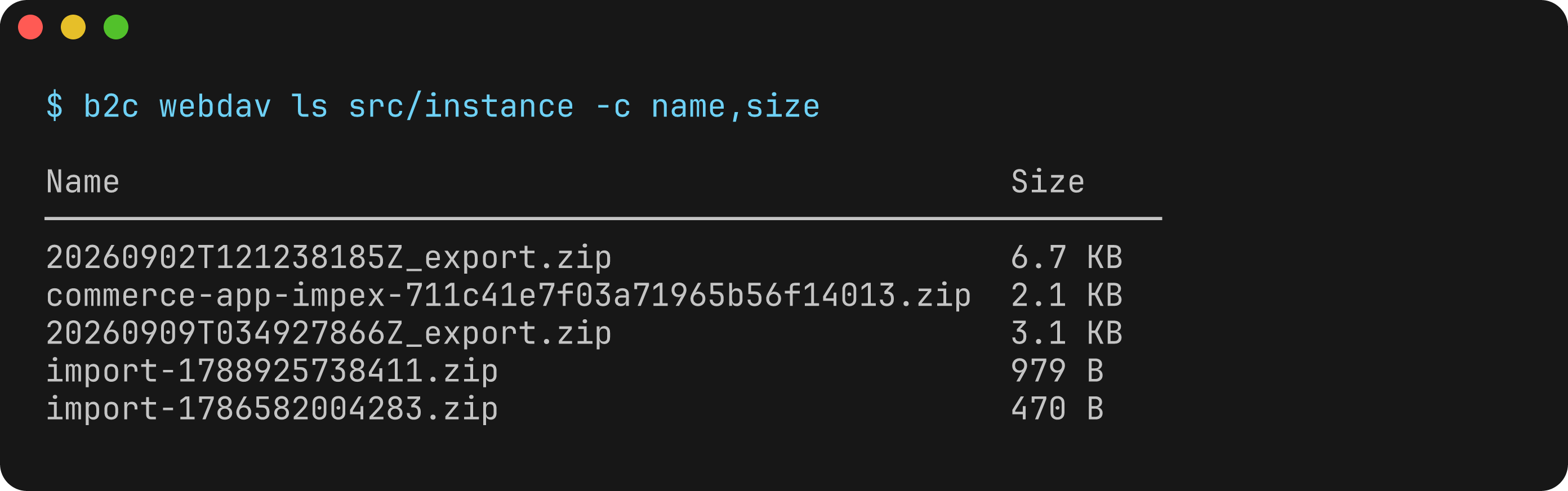
List files and directories in a WebDAV location.
Usage
b2c webdav ls [PATH]Arguments
| Argument | Description | Default |
|---|---|---|
PATH | Path relative to root | Root directory |
Flags
| Flag | Description | Default |
|---|---|---|
-c, --columns | Columns to display (comma-separated). Available: name, type, size, modified, contentType | name, type, size |
-x, --extended | Show all columns including extended fields | false |
Examples
# List root of Impex
b2c webdav ls

# List a subdirectory
b2c webdav ls src/instance

# List cartridges
b2c webdav ls --root=cartridges

# List log files
b2c webdav ls --root=logs

# Output as JSON
b2c webdav ls --root=logs --json
Output
Name                Size       Modified
──────────────────────────────────────────────────────
src/                -          12/20/2024, 10:00 AM
archive.zip         45.2 KB    12/19/2024, 3:30 PM
data.xml            12.8 KB    12/18/2024, 9:15 AM
b2c webdav get
Download a file from WebDAV.
Usage
b2c webdav get <REMOTE>Arguments
| Argument | Description | Required |
|---|---|---|
REMOTE | Remote file path relative to root | Yes |
Flags
| Flag | Description | Default |
|---|---|---|
-o, --output | Output file path (use - for stdout) | Filename in current directory |
Examples
# Download to current directory
b2c webdav get src/instance/export.zip

# Download to specific location
b2c webdav get src/instance/export.zip -o ./downloads/export.zip

# Download a log file
b2c webdav get --root=logs customerror.log

# Download from cartridges
b2c webdav get --root=cartridges app_storefront_base/cartridge/templates/default/home.isml
b2c webdav put
Upload a file to WebDAV.
Usage
b2c webdav put <LOCAL> <REMOTE>Arguments
| Argument | Description | Required |
|---|---|---|
LOCAL | Local file path to upload | Yes |
REMOTE | Remote destination (directory or file path) | Yes |
Examples
# Upload to root directory
b2c webdav put ./export.zip /

# Upload to subdirectory (keeps filename)
b2c webdav put ./export.zip src/instance/

# Upload with renamed file
b2c webdav put ./data.xml src/instance/renamed.xml

# Upload to temp directory
b2c webdav put ./file.tar.gz / --root=temp
Notes
- If
REMOTEends with/or is/, the source filename is used - Missing parent directories under the root are created automatically
b2c webdav mkdir
Create a directory on WebDAV.
Usage
b2c webdav mkdir <PATH>Arguments
| Argument | Description | Required |
|---|---|---|
PATH | Directory path to create (relative to root) | Yes |
Examples
# Create in Impex
b2c webdav mkdir src/instance/my-folder

# Create in temp directory
b2c webdav mkdir --root=temp my-temp-dir

# Create in cartridges
b2c webdav mkdir --root=cartridges new-cartridge
b2c webdav rm
Delete a file or directory from WebDAV.
Usage
b2c webdav rm <PATH>Arguments
| Argument | Description | Required |
|---|---|---|
PATH | Path to delete relative to root | Yes |
Flags
| Flag | Description | Default |
|---|---|---|
--force, -f | Skip confirmation prompt | false |
Examples
# Delete a file (with confirmation)
b2c webdav rm src/instance/old-export.zip

# Delete without confirmation
b2c webdav rm src/instance/old-export.zip --force

# Delete from temp directory
b2c webdav rm --root=temp my-temp-dir --force
Notes
- Deleting a directory removes all contents recursively
- Use
--forceto skip the confirmation prompt
b2c webdav zip
Create a zip archive of a remote file or directory.
Usage
b2c webdav zip <PATH>Arguments
| Argument | Description | Required |
|---|---|---|
PATH | Remote path to zip (relative to root) | Yes |
Examples
# Zip a directory in Impex
b2c webdav zip src/instance/data

# Zip a cartridge
b2c webdav zip --root=cartridges my-cartridge
Notes
- The zip file is created in the same location with
.zipextension - This operation is performed server-side
b2c webdav unzip
Extract a remote zip archive.
Usage
b2c webdav unzip <PATH>Arguments
| Argument | Description | Required |
|---|---|---|
PATH | Remote zip file path (relative to root) | Yes |
Examples
# Extract in Impex
b2c webdav unzip src/instance/export.zip

# Extract a cartridge archive
b2c webdav unzip --root=cartridges my-cartridge.zip
Notes
- Contents are extracted to the same directory as the zip file
- This operation is performed server-side