
Sandbox Commands
Commands for managing On-Demand Sandboxes.
Alias
These commands were previously available as b2c ods <command>. The ods prefix is still accepted as a backward-compatible alias for every command in this topic (e.g., b2c ods list, b2c ods create, b2c ods alias create).
Sandbox ID Formats
Commands that operate on a specific sandbox (get, update, start, stop, restart, delete, operations list, operations get) accept two ID formats:
| Format | Example | Description |
|---|---|---|
| UUID | abc12345-1234-1234-1234-abc123456789 | Full sandbox UUID |
| Realm-instance | zzzv-123 or zzzv_123 | Realm-instance format |
The realm-instance format uses the 4-character realm code followed by a dash (-) or underscore (_) and the instance identifier. When using the realm-instance format, the CLI automatically looks up the corresponding sandbox UUID.
# These are equivalent (assuming zzzv-123 resolves to the UUID)
b2c sandbox get abc12345-1234-1234-1234-abc123456789
b2c sandbox get zzzv-123
Global Sandbox Flags
These flags are available on all sandbox commands:
| Flag | Environment Variable | Description |
|---|---|---|
--sandbox-api-host | SFCC_SANDBOX_API_HOST | Sandbox API hostname (default: admin.dx.commercecloud.salesforce.com) |
Authentication
Sandbox commands work out of the box using the CLI's built-in public client, which authenticates via browser login (Authorization Code + PKCE flow). No API client configuration is required for interactive use.
For automation or CI/CD, you can provide your own API client credentials.
Required Roles
| Auth Method | Role | Configured On |
|---|---|---|
| Built-in client (default) | Sandbox API User | Your user account |
| User Authentication | Sandbox API User | Your user account |
| Client Credentials | Sandbox API User | The API client |
The Sandbox API User role must have a tenant filter configured for the realm(s) you wish to manage.
Configuration
# No configuration needed — opens browser for login
b2c sandbox list

# Or provide your own client ID
b2c sandbox list --client-id xxx

# Client Credentials (for automation)
export SFCC_CLIENT_ID=my-client
export SFCC_CLIENT_SECRET=my-secret
b2c sandbox list
For complete setup instructions, see the Authentication Guide.
b2c sandbox list
List all on-demand sandboxes accessible to your account.
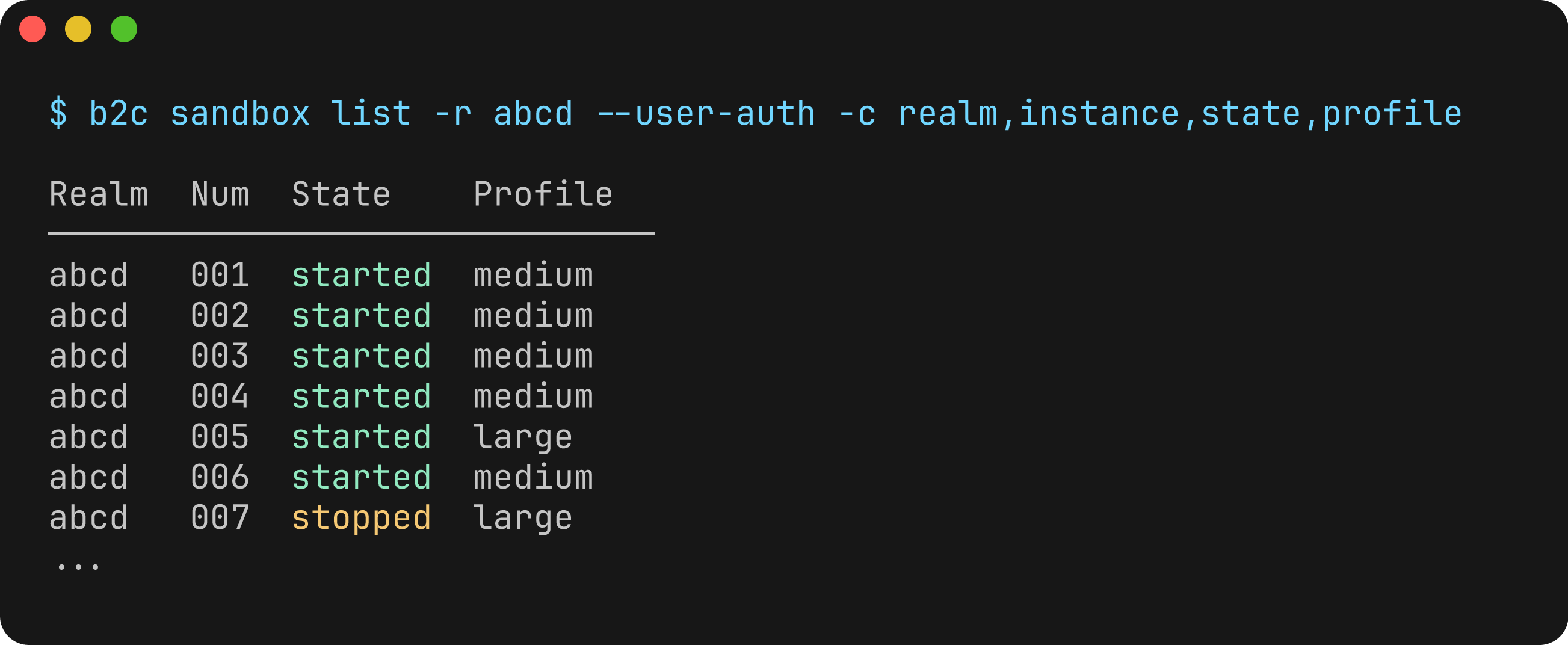
Excerpt from a sandbox listing; identifiers are anonymized.
Usage
b2c sandbox listFlags
| Flag | Description | Default |
|---|---|---|
--realm, -r | Filter by realm ID (four-letter ID) | |
--filter-params | Raw filter parameters (e.g., "realm=abcd&state=started") | |
--show-deleted | Include deleted sandboxes in the list | false |
--columns, -c | Columns to display (comma-separated) | |
--extended, -x | Show all columns including extended fields | false |
Available Columns
realm, instance, state, profile, created, eol, id, hostname, createdBy, autoScheduled, isCloned
Examples
# List all sandboxes
b2c sandbox list

# Filter by realm
b2c sandbox list --realm abcd

# Filter by state and realm
b2c sandbox list --filter-params "realm=abcd&state=started"

# Show extended information
b2c sandbox list --extended

# Custom columns
b2c sandbox list --columns realm,instance,state,hostname

# Output as JSON
b2c sandbox list --json
Output
Realm  Instance  State    Profile  Created     EOL             Cloned
─────────────────────────────────────────────────────────────────────────
abcd   001       started  medium   2024-12-20  2024-12-21      No
abcd   002       stopped  large    2024-12-19  2024-12-20 22:30 Yes
The EOL column displays YYYY-MM-DD normally. When a sandbox expires within 24 hours (or is already expired), the time is also shown as YYYY-MM-DD HH:mm (UTC).
The isCloned column indicates whether a sandbox was created by cloning another sandbox (Yes) or not (No).
b2c sandbox create
Create a new on-demand sandbox.
Usage
b2c sandbox create --realm <REALM>Flags
| Flag | Description | Default |
|---|---|---|
--realm, -r | (Required) Realm ID (four-letter ID) | |
--ttl | Time to live in hours (0 for infinite) | 24 |
--profile | Resource profile (medium, large, xlarge, xxlarge) | medium |
--auto-scheduled | Enable automatic start/stop scheduling | false |
--emails | Comma-separated list of notification email addresses | |
--wait, -w | Wait for sandbox to reach started or failed state | false |
--poll-interval | Polling interval in seconds when using --wait | 10 |
--timeout | Maximum wait time in seconds (0 for no timeout) | 600 |
--set-permissions | Automatically set OCAPI and WebDAV permissions for the client ID used to create the sandbox | true |
--permissions-client-id | Client ID to use for default OCAPI/WebDAV permissions (defaults to auth client ID) | |
--ocapi-settings | Custom OCAPI settings JSON array (replaces defaults) | |
--webdav-settings | Custom WebDAV settings JSON array (replaces defaults) | |
--start-scheduler | Start schedule JSON | |
--stop-scheduler | Stop schedule JSON |
Examples
# Create a sandbox with default settings
b2c sandbox create --realm abcd

# Create with extended TTL
b2c sandbox create --realm abcd --ttl 48

# Create with larger resources
b2c sandbox create --realm abcd --profile large

# Create and wait for it to be ready
b2c sandbox create --realm abcd --wait

# Create with auto-scheduling enabled
b2c sandbox create --realm abcd --auto-scheduled

# Create with notification emails
b2c sandbox create --realm abcd --emails dev@example.com,ops@example.com

# Create without automatic permissions
b2c sandbox create --realm abcd --set-permissions=false

# Use a different client ID for permissions
b2c sandbox create --realm abcd --permissions-client-id my-other-client

# Custom OCAPI settings (replaces defaults)
b2c sandbox create --realm abcd --ocapi-settings '[{"client_id":"my-client","resources":[{"resource_id":"/code_versions","methods":["get"]}]}]'

# Custom start/stop scheduler
b2c sandbox create --realm abcd --start-scheduler '{"weekdays":["MONDAY","TUESDAY"],"time":"08:00:00Z"}' --stop-scheduler '{"weekdays":["MONDAY","TUESDAY"],"time":"19:00:00Z"}'

# Output as JSON
b2c sandbox create --realm abcd --json
Notes
- Sandbox creation can take several minutes
- Use
--waitto block until the sandbox is ready - By default, OCAPI and WebDAV permissions are set for the auth client ID. Use
--permissions-client-idto override the client ID, or--ocapi-settings/--webdav-settingsto provide fully custom settings - The
--start-schedulerand--stop-schedulerflags accept JSON objects withweekdaysandtimefields
b2c sandbox get
Get details of a specific sandbox.
Usage
b2c sandbox get <SANDBOXID>Arguments
| Argument | Description | Required |
|---|---|---|
SANDBOXID | Sandbox ID (UUID or realm-instance, e.g., zzzv-123) | Yes |
Flags
| Flag | Description | Default |
|---|---|---|
--clone-details | Include detailed clone information if the sandbox was created by cloning | false |
Examples
# Get sandbox details using UUID
b2c sandbox get abc12345-1234-1234-1234-abc123456789

# Get sandbox details using realm-instance format
b2c sandbox get zzzv-123

# Get sandbox details with clone information
b2c sandbox get zzzv-123 --clone-details

# Output as JSON
b2c sandbox get zzzv_123 --json
Output
Displays detailed information about the sandbox including:
- Sandbox ID and instance
- Realm and hostname
- State and resource profile
- Creation time and end-of-life
- Links to BM and storefront
If the sandbox was created by cloning another sandbox, a "Clone Details" section is displayed showing:
- Cloned From (realm-instance identifier)
- Source Instance ID (UUID)
When the --clone-details flag is used, additional clone metadata is included:
- Clone ID
- Status
- Target Profile
- Progress Percentage
- Elapsed Time
- Custom Code Version
- Storefront Count
b2c sandbox info
Display sandbox user and system information.
Usage
b2c sandbox infoExamples
# Get sandbox info
b2c sandbox info

# Output as JSON
b2c sandbox info --json
Output
Displays information about:
- Authenticated user
- Available realms
- System status and limits
b2c sandbox ips
List inbound and outbound IP addresses for ODS sandboxes. Use this to allowlist B2C Commerce traffic in firewalls or third-party services.
Usage
b2c sandbox ips [--realm <REALM>]Flags
| Flag | Description | Default |
|---|---|---|
--realm, -r | Realm ID (four-letter ID) to scope IP details to a specific realm | All realms |
Examples
# List IPs across all realms
b2c sandbox ips

# Output as JSON
b2c sandbox ips --json

# Scope to a specific realm
b2c sandbox ips --realm zzzz

# Realm-scoped JSON output
b2c sandbox ips -r zzzz --json
Output
Prints inbound and outbound IP addresses, plus per-sandbox IPs when available. With --json, returns the raw SystemInfoResponse payload.
b2c sandbox start
Start a stopped on-demand sandbox.
Usage
b2c sandbox start <SANDBOXID>Arguments
| Argument | Description | Required |
|---|---|---|
SANDBOXID | Sandbox ID (UUID or realm-instance, e.g., zzzv-123) | Yes |
Examples
# Start a sandbox using UUID
b2c sandbox start abc12345-1234-1234-1234-abc123456789

# Start a sandbox using realm-instance format
b2c sandbox start zzzv-123

# Output as JSON
b2c sandbox start zzzv_123 --json
b2c sandbox stop
Stop a running on-demand sandbox.
Usage
b2c sandbox stop <SANDBOXID>Arguments
| Argument | Description | Required |
|---|---|---|
SANDBOXID | Sandbox ID (UUID or realm-instance, e.g., zzzv-123) | Yes |
Examples
# Stop a sandbox using UUID
b2c sandbox stop abc12345-1234-1234-1234-abc123456789

# Stop a sandbox using realm-instance format
b2c sandbox stop zzzv-123

# Output as JSON
b2c sandbox stop zzzv_123 --json
b2c sandbox restart
Restart an on-demand sandbox.
Usage
b2c sandbox restart <SANDBOXID>Arguments
| Argument | Description | Required |
|---|---|---|
SANDBOXID | Sandbox ID (UUID or realm-instance, e.g., zzzv-123) | Yes |
Examples
# Restart a sandbox using UUID
b2c sandbox restart abc12345-1234-1234-1234-abc123456789

# Restart a sandbox using realm-instance format
b2c sandbox restart zzzv-123

# Output as JSON
b2c sandbox restart zzzv_123 --json
b2c sandbox operations list
List past and current operations on a sandbox (for example start, stop, restart, reset, create, delete, upgrade). This maps to the ODS API GET /sandboxes/{sandboxId}/operations endpoint.
To request a lifecycle operation (start, stop, restart, reset), use b2c sandbox start|stop|restart|reset instead; those commands call POST /sandboxes/{sandboxId}/operations.
Usage
b2c sandbox operations list <SANDBOXID>Arguments
| Argument | Description | Required |
|---|---|---|
SANDBOXID | Sandbox ID (UUID or realm-instance, e.g., zzzv-123) | Yes |
Flags
| Flag | Short | Description | Default |
|---|---|---|---|
--from | Earliest operation time (ISO 8601). If omitted, the API defaults to roughly the last 30 days. | ||
--to | Latest operation time (ISO 8601). If omitted, the API defaults to now. | ||
--operation-state | Filter by lifecycle state: pending, running, or finished | ||
--status | Filter finished operations by outcome: success or failure | ||
--operation | Filter by operation type: start, stop, restart, reset, create, delete, upgrade | ||
--sort-order | Sort order: asc or desc | ||
--sort-by | Sort field: created, operation_state, status, or operation | ||
--page | Page index (0-based) | ||
--per-page | Page size (API default is typically 20) | ||
--columns, -c | Columns to display (comma-separated); see Available columns below | ||
--extended, -x | Include extended columns (for example operationBy) | false |
Available columns
id, operation, operationState, status, sandboxState, createdAt, operationBy (extended)
Default columns: operation, operationState, status, sandboxState, createdAt, id
Examples
# List recent operations for a sandbox
b2c sandbox operations list zzzv-123

# Only finished operations
b2c sandbox operations list zzzv-123 --operation-state finished

# Date range and paging
b2c sandbox operations list zzzv-123 --from 2025-01-01 --to 2025-12-31 --page 0 --per-page 50

# Custom columns
b2c sandbox operations list zzzv-123 --columns operation,operationState,status,createdAt

# Full API response (includes paging metadata when present)
b2c sandbox operations list zzzv-123 --json
Output
When not using --json, the command prints a one-line paging summary when metadata is present, then a table of operations. Use --json to inspect metadata (page, totals) and the raw data array.
b2c sandbox operations get
Return details for a single sandbox operation by its operation UUID (maps to GET /sandboxes/{sandboxId}/operations/{operationId}). Use the operation id from b2c sandbox operations list or from the JSON output of b2c sandbox start|stop|restart|reset when using --json.
Usage
b2c sandbox operations get <SANDBOXID> <OPERATIONID>Arguments
| Argument | Description | Required |
|---|---|---|
SANDBOXID | Sandbox ID (UUID or realm-instance, e.g., zzzv-123) | Yes |
OPERATIONID | Operation UUID | Yes |
Examples
# Show operation details (human-readable)
b2c sandbox operations get zzzv-123 550e8400-e29b-41d4-a716-446655440000

# Operation as JSON (sandbox operation model only)
b2c sandbox operations get zzzv-123 550e8400-e29b-41d4-a716-446655440000 --json
Output
When not using --json, the command prints a short Operation Details block including operation type, state, outcome, sandbox state, created time, and who ran the operation when available.
With --json, the command returns the operation object (not the full API envelope), consistent with b2c sandbox get.
b2c sandbox delete
Delete an on-demand sandbox.
Usage
b2c sandbox delete <SANDBOXID>Arguments
| Argument | Description | Required |
|---|---|---|
SANDBOXID | Sandbox ID (UUID or realm-instance, e.g., zzzv-123) | Yes |
Flags
| Flag | Description | Default |
|---|---|---|
--force, -f | Skip confirmation prompt | false |
--wait, -w | Wait for the sandbox to be fully deleted before returning | false |
--poll-interval | Polling interval in seconds when using --wait | 10 |
--timeout | Maximum time to wait in seconds when using --wait (0 for no timeout) | 600 |
Examples
# Delete a sandbox using UUID (with confirmation prompt)
b2c sandbox delete abc12345-1234-1234-1234-abc123456789

# Delete a sandbox using realm-instance format
b2c sandbox delete zzzv-123

# Delete without confirmation
b2c sandbox delete zzzv_123 --force

# Delete and wait for completion
b2c sandbox delete zzzv_123 --force --wait
Notes
- The command will prompt for confirmation unless
--forceis used - Deleted sandboxes cannot be recovered
- Use
--waitto block until the sandbox is fully removed
b2c sandbox reset
Reset an on-demand sandbox to a clean state. This clears all data and code in the sandbox but preserves its configuration (realm, profile, schedulers, etc.).
Usage
b2c sandbox reset <SANDBOXID>Arguments
| Argument | Description | Required |
|---|---|---|
SANDBOXID | Sandbox ID (UUID or realm-instance, e.g., zzzv-123) | Yes |
Flags
| Flag | Description | Default |
|---|---|---|
--wait, -w | Wait for the sandbox to reach started state after reset | false |
--poll-interval | Polling interval in seconds when using --wait | 10 |
--timeout | Maximum time to wait in seconds when using --wait (0 for no timeout) | 600 |
--force, -f | Skip confirmation prompt | false |
Examples
# Trigger a reset and return immediately
b2c sandbox reset zzzv-123

# Reset and wait for the sandbox to return to started state
b2c sandbox reset zzzv-123 --wait

# Reset with a custom polling interval and timeout
b2c sandbox reset zzzv-123 --wait --poll-interval 15 --timeout 900

# Reset without confirmation
b2c sandbox reset zzzv-123 --force

# Output operation details as JSON
b2c sandbox reset zzzv-123 --json
Notes
- Reset is destructive: it permanently removes all data and code in the sandbox.
- When
--waitis used, the command periodically polls the sandbox and logs state transitions as[<elapsed>s] State: <state>until it reachesstartedor the timeout is hit.
b2c sandbox update
Update a sandbox's TTL, scheduling, resource profile, tags, or notification emails.
Usage
b2c sandbox update <SANDBOXID> [FLAGS]Arguments
| Argument | Description | Required |
|---|---|---|
SANDBOXID | Sandbox ID (UUID or realm-instance, e.g., zzzv-123) | Yes |
Flags
| Flag | Description |
|---|---|
--ttl | Number of hours to add to sandbox lifetime (0 or less for infinite). Must adhere to the maximum TTL configuration together with previous extensions. |
--auto-scheduled | Enable or disable automatic start/stop scheduling |
--resource-profile | Resource profile (medium, large, xlarge, xxlarge) |
--tags | Comma-separated list of tags |
--emails | Comma-separated list of notification email addresses |
--start-scheduler | Start schedule JSON |
--stop-scheduler | Stop schedule JSON |
--clear-start-scheduler | Remove existing start scheduler |
--clear-stop-scheduler | Remove existing stop scheduler |
At least one flag is required.
Examples
# Extend sandbox lifetime by 48 hours
b2c sandbox update zzzv-123 --ttl 48

# Set infinite lifetime
b2c sandbox update zzzv-123 --ttl 0

# Enable auto-scheduling
b2c sandbox update zzzv-123 --auto-scheduled

# Disable auto-scheduling
b2c sandbox update zzzv-123 --auto-scheduled=false

# Set tags
b2c sandbox update zzzv-123 --tags ci,nightly

# Update resource profile
b2c sandbox update zzzv-123 --resource-profile large

# Set notification emails
b2c sandbox update zzzv-123 --emails dev@example.com,qa@example.com

# Enable automatic scheduling, set a start scheduler, and remove the stop scheduler
b2c sandbox update zzzv-123 --auto-scheduled --start-scheduler '{"weekdays":["MONDAY"],"time":"08:00:00Z"}' --clear-stop-scheduler

# Combine multiple updates
b2c sandbox update zzzv-123 --ttl 48 --resource-profile xlarge --tags ci,nightly

# Output as JSON
b2c sandbox update zzzv-123 --ttl 48 --json
Notes
- The
--ttlvalue is added to the existing sandbox lifetime, not an absolute value. Together with previous extensions, it must adhere to the realm's maximum TTL configuration. - Setting
--ttlto 0 or less gives the sandbox an infinite lifetime (subject to realm configuration). --auto-scheduledcontrols whether automatic start/stop behavior is enabled for the sandbox.--start-schedulerand--stop-schedulerdefine scheduler values, but scheduler automation is effective only when--auto-scheduledis enabled.- Use
--clear-start-schedulerand--clear-stop-schedulerto remove an existing scheduler.
b2c sandbox usage
Show usage information for a specific sandbox over a date range.
Usage
b2c sandbox usage <SANDBOXID> [--from <DATE>] [--to <DATE>]Arguments
| Argument | Description | Required |
|---|---|---|
SANDBOXID | Sandbox ID (UUID or realm-instance, e.g., zzzv-123) | Yes |
Flags
| Flag | Description |
|---|---|
--from | Start date for usage data (ISO 8601, e.g., 2024-01-01) |
--to | End date for usage data (ISO 8601, e.g., 2024-01-31) |
If --from / --to are omitted, the API will use its own defaults (typically a recent window).
Examples
# Show recent usage for a sandbox
b2c sandbox usage zzzz-001

# Show usage for a specific period
b2c sandbox usage zzzz-001 --from 2024-01-01 --to 2024-01-31

# Get raw usage response as JSON (includes detailed fields)
b2c sandbox usage zzzz-001 --from 2024-01-01 --to 2024-01-31 --json
Output
When not using --json, the command prints a concise summary:
- Total sandbox seconds
- Minutes up / minutes down
- Minutes up by profile (if available)
If detailed usage data is present (granular history, profiles, etc.), the command prints a hint to re-run with --json to inspect the full structure. If no usage data is returned for the requested period, it prints a friendly message instead of failing.
b2c sandbox settings
Show effective OCAPI and WebDAV settings for a specific sandbox.
Usage
b2c sandbox settings <SANDBOXID>Arguments
| Argument | Description | Required |
|---|---|---|
SANDBOXID | Sandbox ID (UUID or realm-instance, e.g., zzzv-123) | Yes |
Examples
# Show settings summary for a sandbox
b2c sandbox settings zzzz-001

# Output full settings payload as JSON
b2c sandbox settings zzzz-001 --json
Output
When not using --json, the command prints:
- Number of OCAPI client entries
- Number of WebDAV client entries
- A short per-client breakdown for each settings type
b2c sandbox storage
Show filesystem storage usage for a specific sandbox.
Usage
b2c sandbox storage <SANDBOXID>Arguments
| Argument | Description | Required |
|---|---|---|
SANDBOXID | Sandbox ID (UUID or realm-instance, e.g., zzzv-123) | Yes |
Examples
# Show storage table for a sandbox
b2c sandbox storage zzzz-001

# Output raw storage response as JSON
b2c sandbox storage zzzz-001 --json
Output
When not using --json, the command prints a table with one row per filesystem:
- Filesystem name
- Total space (MB)
- Used space (MB)
- Used percentage
Sandbox Aliases
Sandbox aliases let you access a sandbox via a custom hostname instead of the default instance hostname.
Alias commands are available both under the sandbox topic and the legacy ods aliases:
b2c sandbox alias createb2c sandbox alias listb2c sandbox alias getb2c sandbox alias delete
b2c sandbox alias create
Create a hostname alias for a sandbox.
Usage
b2c sandbox alias create <SANDBOXID> <HOSTNAME> [FLAGS]Arguments
| Argument | Description | Required |
|---|---|---|
SANDBOXID | Sandbox ID (UUID or realm-instance, e.g., zzzv-123) | Yes |
HOSTNAME | Hostname alias to register (e.g., my-store.example.com) | Yes |
Flags
| Flag | Description | Default |
|---|---|---|
--unique, -u | Make the alias unique (required for Let’s Encrypt certificates) | false |
--letsencrypt | Request a Let’s Encrypt certificate (requires --unique) | false |
--no-open | Do not open the registration URL in a browser for non‑unique aliases | false |
Examples
# Simple alias
b2c sandbox alias create zzzv-123 my-store.example.com

# Unique alias (suitable for TLS)
b2c sandbox alias create zzzv-123 secure-store.example.com --unique

# Unique alias with Let’s Encrypt certificate
b2c sandbox alias create zzzv-123 secure-store.example.com --unique --letsencrypt

# Create alias but handle registration manually
b2c sandbox alias create zzzv-123 my-store.example.com --no-open

# Output alias details as JSON
b2c sandbox alias create zzzv-123 my-store.example.com --json
Behavior
- For unique aliases, the API may return a DNS TXT record that must be added to your DNS provider before the alias becomes active.
- For non‑unique aliases, the API returns a registration URL; the CLI opens this URL in a browser by default (unless
--no-openis set) to complete registration.
b2c sandbox alias list
List or inspect aliases for a sandbox.
Usage
b2c sandbox alias list <SANDBOXID> [--alias-id <ALIASID>]Arguments
| Argument | Description | Required |
|---|---|---|
SANDBOXID | Sandbox ID (UUID or realm-instance, e.g., zzzv-123) | Yes |
Flags
| Flag | Description |
|---|---|
--alias-id | Specific alias ID to retrieve; if omitted, lists all aliases |
Examples
# List all aliases for a sandbox
b2c sandbox alias list zzzv-123

# Get details for a single alias
b2c sandbox alias list zzzv-123 --alias-id some-alias-uuid

# Output as JSON
b2c sandbox alias list zzzv-123 --json
When listing multiple aliases without --json, the command prints a table with:
- Alias ID
- Hostname
- Status
- Whether the alias is unique
- DNS verification record (if any)
For one alias by ID, you can also use b2c sandbox alias get (same API as list --alias-id).
b2c sandbox alias get
Get details for a single hostname alias (ODS API GET /sandboxes/{sandboxId}/aliases/{sandboxAliasId}). This is equivalent to b2c sandbox alias list <SANDBOXID> --alias-id <ALIASID> but uses positional arguments only.
Usage
b2c sandbox alias get <SANDBOXID> <ALIASID>Arguments
| Argument | Description | Required |
|---|---|---|
SANDBOXID | Sandbox ID (UUID or realm-instance, e.g., zzzv-123) | Yes |
ALIASID | Alias UUID | Yes |
Examples
# Human-readable details
b2c sandbox alias get zzzv-123 some-alias-uuid

# Alias object as JSON (same shape as list/get for a single alias)
b2c sandbox alias get zzzv-123 some-alias-uuid --json
Output
When not using --json, the command prints an Alias Details section (hostname, status, uniqueness, DNS TXT verification, registration URL when present, optional cookie hint). With --json, it returns the alias object only.
b2c sandbox alias delete
Delete a sandbox alias.
Usage
b2c sandbox alias delete <SANDBOXID> <ALIASID> [--force]Arguments
| Argument | Description | Required |
|---|---|---|
SANDBOXID | Sandbox ID (UUID or realm-instance, e.g., zzzv-123) | Yes |
ALIASID | Alias ID to delete | Yes |
Flags
| Flag | Description | Default |
|---|---|---|
--force, -f | Skip confirmation prompt | false |
Examples
# Delete an alias with confirmation
b2c sandbox alias delete zzzv-123 alias-uuid-here

# Delete an alias without confirmation
b2c sandbox alias delete zzzv-123 alias-uuid-here --force

# Delete and get structured result
b2c sandbox alias delete zzzv-123 alias-uuid-here --json
Sandbox Cloning
On-demand sandbox cloning enables you to create replicas of existing sandboxes in minutes, not hours. It helps teams move faster while reducing risk by providing fully isolated environments for development, testing, and operational workflows.
With a single API call, you can provision a fully isolated replica of your sandbox that includes your database, application code, platform configurations, and all configured feature toggles.
Important: To ensure a consistent and reliable clone, the source sandbox is automatically placed in a protected Stopped state during the cloning process. This safeguard guarantees data integrity and configuration consistency. Once cloning is complete, the source sandbox resumes normal operation.
Each cloned sandbox is fully isolated, with dedicated compute, storage, and database resources.
You can also create multiple clones upto 5 from a single source in one request (1 to many cloning) using --target-count. All clones in the batch share a batchId, and each clone's response/details list the other clones in the batch as siblingCloneIds.
Clone commands are available both under the sandbox topic and the legacy ods aliases:
b2c sandbox clone listb2c sandbox clone createb2c sandbox clone get
Clone ID Format
Clone IDs follow a specific pattern: realm-instance-timestamp
- Example:
aaaa-002-1642780893121 - Pattern: 4-letter realm code, followed by 3-digit instance number, followed by 13-digit timestamp
b2c sandbox clone list
List all clones for a specific sandbox.
Usage
b2c sandbox clone list <SANDBOXID>Arguments
| Argument | Description | Required |
|---|---|---|
SANDBOXID | Sandbox ID (UUID or realm-instance, e.g., zzzv-123) | Yes |
Flags
| Flag | Description |
|---|---|
--from | Filter clones created on or after this date (ISO 8601 date format, e.g., 2024-01-01) |
--to | Filter clones created on or before this date (ISO 8601 date format, e.g., 2024-12-31) |
--status | Filter clones by status (Pending, InProgress, Failed, Completed) |
--batch-id | Filter clones belonging to a specific 1 to many cloning batch |
--columns, -c | Columns to display (comma-separated) |
--extended, -x | Show all columns |
Available Columns
cloneId, sourceInstance, targetInstance, status, progressPercentage, createdAt, lastUpdated, elapsedTimeInSec, customCodeVersion, batchId
Default columns: cloneId, sourceInstance, targetInstance, status, progressPercentage, createdAt
Examples
# List all clones for a sandbox
b2c sandbox clone list zzzv-123

# Filter by status
b2c sandbox clone list zzzv-123 --status Completed

# Filter by date range
b2c sandbox clone list zzzv-123 --from 2024-01-01 --to 2024-12-31

# Show all columns
b2c sandbox clone list zzzv-123 --extended

# Custom columns
b2c sandbox clone list zzzv-123 --columns cloneId,status,progressPercentage

# List clones belonging to a specific 1 to many cloning batch
b2c sandbox clone list zzzv-123 --batch-id batch-abcd-002-1700000000000-a1b2c3d4

# Output as JSON
b2c sandbox clone list zzzv-123 --json
Output
Clone ID                 Source Instance  Target Instance  Status       Progress %  Created At
──────────────────────────────────────────────────────────────────────────────────────────────
aaaa-001-1642780893121   aaaa-000         aaaa-001         COMPLETED    100%        2024-02-27 10:00
aaaa-002-1642780893122   aaaa-000         aaaa-002         IN_PROGRESS  75%         2024-02-27
The Created At column displays YYYY-MM-DD HH:mm when the clone was created within the last 24 hours, otherwise just YYYY-MM-DD (all times in UTC).
b2c sandbox clone create
Create a new sandbox clone from an existing sandbox. This creates a complete copy of the source sandbox including all data, configuration, and custom code.
Usage
b2c sandbox clone create <SANDBOXID>Arguments
| Argument | Description | Required |
|---|---|---|
SANDBOXID | Sandbox ID (UUID or realm-instance, e.g., zzzv-123) to clone from | Yes |
Flags
| Flag | Description | Default |
|---|---|---|
--target-profile | Resource profile for the cloned sandbox (medium, large, xlarge, xxlarge). Optional. | Source sandbox profile |
--ttl | Time to live in hours (0 or negative = infinite, minimum 24 hours). Values between 1-23 are not allowed. | 24 |
--emails | Comma-separated list of notification email addresses | |
--target-count | Number of clones to create from this source (1 to many cloning). Valid values are 1 to 5. | 1 |
--wait, -w | Wait for the clone (or all clones in the batch) to complete before returning | false |
--poll-interval | Polling interval in seconds when using --wait | 10 |
--timeout | Maximum time to wait in seconds when using --wait (0 for no timeout) | 1800 |
Examples
# Create a clone with same profile as source sandbox
b2c sandbox clone create zzzv-123

# Create a clone with custom TTL (uses source profile)
b2c sandbox clone create zzzv-123 --ttl 48

# Create a clone with a different profile
b2c sandbox clone create zzzv-123 --target-profile large

# Create a clone with large profile and extended TTL
b2c sandbox clone create zzzv-123 --target-profile large --ttl 48

# Create a clone with notification emails
b2c sandbox clone create zzzv-123 --emails dev@example.com,qa@example.com

# Create a clone with infinite TTL
b2c sandbox clone create zzzv-123 --ttl 0

# Create 3 clones from the same source in one request (1 to many cloning)
b2c sandbox clone create zzzv-123 --target-count 3

# Create 3 clones and wait for all of them to complete
b2c sandbox clone create zzzv-123 --target-count 3 --wait

# Output as JSON
b2c sandbox clone create zzzv-123 --json
Output
✓ Sandbox clone creation started successfully
Clone ID: aaaa-002-1642780893121

To check the clone status, run:
  b2c sandbox clone get zzzv-123 aaaa-002-1642780893121
When --target-count is greater than 1, the output includes the batch ID and the clone IDs of every clone in the batch instead of a single clone ID:
✓ Sandbox clone batch creation started successfully (3 clones)
Batch ID: batch-abcd-002-1700000000000-a1b2c3d4
Clone IDs: aaaa-002-1642780893121, aaaa-003-1642780893122, aaaa-004-1642780893123
Notes
- Source sandbox will be stopped: The source sandbox is automatically placed in a Stopped state during cloning to ensure data integrity and configuration consistency. It resumes normal operation once cloning is complete.
- Cloning typically completes in minutes, though duration depends on sandbox size and data volume
- The cloned sandbox is fully isolated with dedicated compute, storage, and database resources
- When
--target-profileis not specified, the API automatically uses the source sandbox's resource profile (no additional API call is made) - The TTL must be 0 or negative (infinite), or 24 hours or greater. Values between 1-23 are rejected
- The clone will be created as a new sandbox instance in the same realm
- With
--target-countgreater than 1, all clones in the batch share the same source, TTL, profile, and notification emails. Use--waitto poll every clone in the batch until each reaches a terminal state, orb2c sandbox clone list --batch-id <batchId>to check on them later
b2c sandbox clone get
Retrieve detailed information about a specific sandbox clone, including status, progress, and metadata.
Usage
b2c sandbox clone get <SANDBOXID> <CLONEID>Arguments
| Argument | Description | Required |
|---|---|---|
SANDBOXID | Sandbox ID (UUID or realm-instance, e.g., zzzv-123) | Yes |
CLONEID | Clone ID (e.g., aaaa-002-1642780893121) | Yes |
Examples
# Get clone details
b2c sandbox clone get zzzv-123 aaaa-002-1642780893121

# Output as JSON
b2c sandbox clone get zzzv-123 aaaa-002-1642780893121 --json
Output
Displays comprehensive clone information in a formatted table:
Clone Details
──────────────────────────────────────────────────
Clone ID:                 aaaa-002-1642780893121
Source Instance:          aaaa-000
Source Instance ID:       11111111-2222-3333-4444-555555555555
Target Instance:          aaaa-002
Target Instance ID:       66666666-7777-8888-9999-000000000000
Realm:                    aaaa
Status:                   IN_PROGRESS
Progress:                 75%
Created At:               2/27/2025, 10:00:00 AM
Last Known State:         Finalizing Clone
Custom Code Version:      version1
Storefront Count:         0
Filesystem Usage Size:    1073741824
Database Transfer Size:   2147483648
If the clone was created as part of a 1 to many cloning batch (--target-count greater than 1), the output also includes the batch ID and the clone IDs of the other clones in the batch:
Batch ID:                 batch-abcd-002-1700000000000-a1b2c3d4
Sibling Clone IDs:        aaaa-003-1642780893122, aaaa-004-1642780893123
For the complete response including all metadata, use the --json flag.
Clone Status Values
| Status | Description |
|---|---|
PENDING | Clone is queued and waiting to start |
IN_PROGRESS | Clone operation is currently running |
COMPLETED | Clone finished successfully |
FAILED | Clone operation failed |
Realm-Level Commands
Realm commands operate at the realm level rather than on an individual sandbox. Use them under the existing sandbox topics:
b2c sandbox realm list(orb2c ods realm list)b2c sandbox realm configuration(orb2c ods realm configuration)b2c sandbox realm get(orb2c ods realm get)b2c sandbox realm update(orb2c ods realm update)b2c sandbox realm usage(orb2c ods realm usage)b2c sandbox realm usages(orb2c ods realm usages)
Required Access for Realm Commands
To run b2c sandbox realm (or b2c ods realm) commands, your user or API client must have realm‑level access in Account Manager (typically a role ending in _sbx for sandbox management).
b2c sandbox realm list
List realms eligible for sandbox management.
Usage
b2c sandbox realm list [REALM]Arguments
| Argument | Description | Required |
|---|---|---|
REALM | Optional realm ID filter (four-letter ID) | No |
Examples
# List all realms you can manage
b2c sandbox realm list

# List a single realm
b2c sandbox realm list zzzz

# JSON output
b2c sandbox realm list --json
When REALM is omitted, the command discovers realms from the /me endpoint.
b2c sandbox realm configuration
Get sandbox configuration for a specific realm.
Usage
b2c sandbox realm configuration <REALM>Arguments
| Argument | Description | Required |
|---|---|---|
REALM | Realm ID (four-letter ID) | Yes |
Examples
# Get realm sandbox configuration
b2c sandbox realm configuration zzzz

# JSON output
b2c sandbox realm configuration zzzz --json
When not using --json, the command prints configuration details such as emails, sandbox limits, TTL values, and start/stop schedulers.
b2c sandbox realm get
Get detailed information about a specific realm, including configuration.
Usage
b2c sandbox realm get <REALM>Arguments
| Argument | Description | Required |
|---|---|---|
REALM | Realm ID (four-letter ID) | Yes |
Examples
# Get realm details
b2c sandbox realm get zzzz

# JSON output (includes configuration and account details when available)
b2c sandbox realm get zzzz --json
Output
The command prints:
- Realm ID, name, and enabled status
- Realm configuration, including:
- Notification emails (if configured)
- Whether limits are enabled
- Total number of sandboxes
- Max sandbox TTL (displays
0when TTL is effectively unlimited) - Default sandbox TTL
- Whether local users are allowed
- Start/stop scheduler definitions (as JSON) when present
b2c sandbox realm update
Update realm‑level sandbox configuration for TTL and start/stop schedulers.
Usage
b2c sandbox realm update <REALM> [FLAGS]Arguments
| Argument | Description | Required |
|---|---|---|
REALM | Realm ID (four-letter ID) to update | Yes |
Flags
| Flag | Description |
|---|---|
--max-sandbox-ttl | Maximum sandbox TTL in hours (0 for unlimited, subject to quotas) |
--default-sandbox-ttl | Default sandbox TTL in hours when no TTL is specified at creation |
--start-scheduler | Start schedule JSON for sandboxes in this realm |
--stop-scheduler | Stop schedule JSON for sandboxes in this realm |
--clear-start-scheduler | Remove existing start scheduler for sandboxes in this realm |
--clear-stop-scheduler | Remove existing stop scheduler for sandboxes in this realm |
--emails | Comma-separated list of realm notification email addresses |
--local-users-allowed | Enable or disable local user management for sandboxes in realm configuration |
The scheduler flags expect a JSON value; use the dedicated --clear-* flags to remove an existing scheduler:
--start-scheduler '{"weekdays":["MONDAY"],"time":"08:00:00Z"}'
--clear-stop-scheduler    # remove existing stop scheduler
Examples
# Set max TTL to unlimited and default TTL to 24 hours
b2c sandbox realm update zzzz --max-sandbox-ttl 0 --default-sandbox-ttl 24

# Configure weekday start/stop schedules
b2c sandbox realm update zzzz \
  --start-scheduler '{"weekdays":["MONDAY","TUESDAY"],"time":"08:00:00Z"}' \
  --stop-scheduler '{"weekdays":["MONDAY","TUESDAY"],"time":"19:00:00Z"}'

# Remove an existing stop scheduler
b2c sandbox realm update zzzz --clear-stop-scheduler

# Update realm emails and local user setting
b2c sandbox realm update zzzz --emails dev@example.com,ops@example.com --local-users-allowed
If no update flags are provided, the command fails with a helpful error explaining which flags can be used.
b2c sandbox realm usage
Show usage information for a realm across all sandboxes in that realm.
Usage
b2c sandbox realm usage <REALM> [FLAGS]Arguments
| Argument | Description | Required |
|---|---|---|
REALM | Realm ID (four-letter ID) | Yes |
Flags
| Flag | Description |
|---|---|
--from | Earliest date to include in usage (ISO 8601; API defaults to ~30 days ago if omitted) |
--to | Latest date to include in usage (ISO 8601; API defaults to today if omitted) |
--granularity | Data granularity (daily, weekly, or monthly) |
--detailed-report | Include detailed usage information in the response |
Examples
# Realm usage for a recent window
b2c sandbox realm usage zzzz

# Realm usage for a specific range
b2c sandbox realm usage zzzz --from 2024-01-01 --to 2024-01-31

# Daily granularity with full JSON response
b2c sandbox realm usage zzzz --granularity daily --detailed-report --json
When not using --json, the command prints a summary including:
- Active / created / deleted sandbox counts
- Minutes up / minutes down
- Sandbox seconds
- Minutes up by profile (if present)
If detailed usage is available, it prints a hint to re-run with --json for the full structure. If no usage data is returned for the requested period, it prints a friendly message instead of failing.
b2c sandbox realm usages
Show usage information for multiple realms in one request.
Usage
b2c sandbox realm usages [FLAGS]Flags
| Flag | Description |
|---|---|
--realm | Realm IDs to include (repeat flag or provide comma-separated values) |
--from | Earliest date to include in usage (ISO 8601) |
--to | Latest date to include in usage (ISO 8601) |
--detailed-report | Include detailed usage information in the response |
If --realm is omitted, the command auto-discovers realms from /me and queries usage for all discovered realms.
Examples
# Usage for all realms available to the current user
b2c sandbox realm usages

# Usage for two specific realms
b2c sandbox realm usages --realm zzzz --realm yyyy

# Usage for comma-separated realms and date range
b2c sandbox realm usages --realm zzzz,yyyy --from 2024-01-01 --to 2024-01-31

# Detailed report in JSON
b2c sandbox realm usages --detailed-report --json
When not using --json, the command prints one row per realm with summary metrics such as:
- Active / created / deleted sandbox counts
- Minutes up / minutes down
- Sandbox seconds