
MCP Tools
Use B2C Commerce documentation, deployment, debugging, and API tools from your assistant. The plugin installation includes all toolsets; connected capabilities use your existing B2C configuration.
These tables list tool names for reference and for your client's tool controls. Optional toolset customization is covered at the end of this page.
Documentation and skills
Toolsets: All
Find answers across Salesforce B2C Commerce references and guides from your assistant.
Look up Script API behavior, storefront patterns, API setup, standard job steps, and XML import/export formats. Salesforce Help adds Business Manager guidance for administrators and merchants: jobs, replication, access, catalogs, pricing, promotions, search, and content. Ask for an explanation applied to your task and links to the source documentation.
No B2C Commerce credentials required.
| Tool | Capability |
|---|---|
skills_read | Find development, operations, CLI, Storefront Next, and MCP workflow skills. |
docs_search | Find platform references, guides, Salesforce Help, and tooling docs. |
docs_read | Read a documentation article. |
docs_list | Browse documentation categories and titles. |
docs_schema_search | Find XML import/export schemas. |
docs_schema_read | Read an XML schema. |
docs_schema_list | List available XML schemas. |
The included skill collections complement documentation with development patterns and operational workflows. No separate skills installation is needed. Skills are also served as MCP resources (skill:// URIs), and assistants that support the MCP Skills extension list the server's MCP workflow skills (b2c-mcp-server, b2c-mcp-config, b2c-mcp-scapi, b2c-mcp-cip, b2c-mcp-debugger) alongside their own skills.
Check this catalog import XML for errors and tell me which existing product data it would replace.
Documentation search is also available through the B2C CLI. See documentation topic settings to customize coverage.
SCAPI Development
Toolsets: SCAPI, PWAV3, STOREFRONTNEXT
Requires OAuth, the instance short code, and tenant ID. See authentication and scopes.
| Tool | Capability | OAuth scope |
|---|---|---|
scapi_schemas_list | Browse and read standard and custom API schemas. | sfcc.scapi-schemas |
scapi_custom_apis_get_status | Check custom endpoint registration. | sfcc.custom-apis |
SCAPI Code Mode
Toolsets: SCAPI, PWAV3, STOREFRONTNEXT
Explore nearly 600 Salesforce Commerce API operations and work with your instance's data.
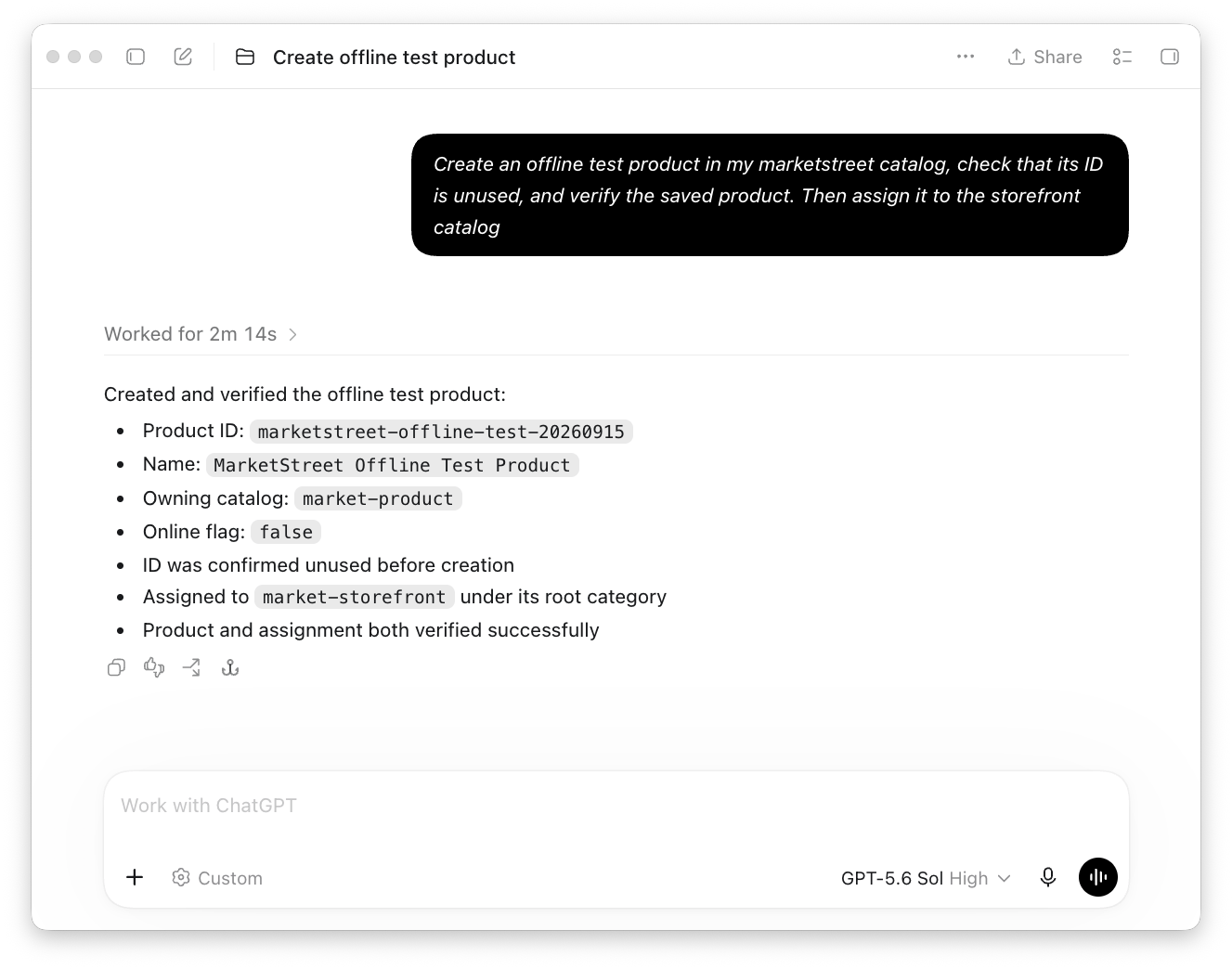
Explore products, catalogs, orders, customers, inventory, pricing, and more. SCAPI code mode lets your assistant work across APIs in a single task: create a product and assign it to a category, review a campaign's promotions, or investigate failed jobs. Describe the outcome you want in your own words; you do not need to write code or choose API calls.
| Tool | Capability |
|---|---|
scapi_search | Find Admin and Shopper API operations by task, and their requirements. |
scapi_execute | Read and manage B2C Commerce data through standard and custom Admin APIs. |
scapi_snippet_save | Save a workflow for reuse across sessions. |
The standard API reference works offline without credentials. Ask your assistant to search your instance's live schemas to include your custom attributes, custom APIs, and APIs released after your installed version; this uses the Schemas API (sfcc.scapi-schemas scope), and the assistant can then call what it found. Working with your instance's data requires OAuth credentials and scopes for the requested operations.
Review changes before they happen. With Safety Mode, you can let your assistant inspect data while asking for approval before selected changes. For example, review a new product before it is created, then approve its category assignment separately. Your assistant app must support these approval prompts; otherwise, the change is blocked. Declining stops the task without undoing earlier changes. Set up product approvals.
Custom attributes and custom Admin APIs are supported. Discovering your instance's custom definitions requires the sfcc.scapi-schemas scope; custom APIs also require their declared scopes. See code mode access.
Shopper APIs run as a guest shopper using your SLAS client (slasClientId, and slasClientSecret for private clients) and site. A Storefront Next project's .env provides these. The guest session lasts for the MCP server session, so a basket created in one request is available to later ones.
Current limits: Code mode does not yet run registered-shopper-only operations, trusted-system or trusted-agent on-behalf operations, or upload and download binary files.
Create a test product in my catalog and keep it offline while I finish setting it up.
Ready-to-use workflows cover product creation and category assignment, campaign reviews, job history and step inspection, code-version checks, and site cartridge path checks. Products created with the built-in workflow start offline unless you request otherwise.
Which jobs failed this week, and what needs attention?
Summarize the promotions attached to this campaign, including enabled status and schedules.
Ask your assistant to save a useful workflow so you can repeat it for other products, campaigns, or dates. Saved workflows remain available across sessions and use the credentials and safety settings of the project where you run them.
Logs
Logs may contain sensitive data; see data handling.
Instance logs
Toolsets: CARTRIDGES, DIAGNOSTICS, SCAPI
| Tool | Capability |
|---|---|
logs_list_files | Browse instance log files. |
logs_get_recent | Read and filter recent instance logs. |
logs_watch | Start, list, or stop instance log watches. |
logs_watch_poll | Retrieve entries from an instance log watch. |
Instance logs require WebDAV log-read access.
Watch my sandbox logs while I reproduce this checkout error and help me find the cause.
Managed Runtime logs
Toolsets: DIAGNOSTICS, PWAV3, STOREFRONTNEXT
| Tool | Capability |
|---|---|
mrt_logs_watch | Start, list, or stop live MRT log streams. |
mrt_logs_watch_poll | Retrieve entries from an MRT log stream. |
MRT logs require an API key, project, and environment; historical MRT logs are not available.
Debugging
Toolsets: CARTRIDGES, DIAGNOSTICS, SCAPI
Let your assistant investigate what happens inside a running cartridge. It can pause at a breakpoint, inspect the call stack and variable values, and step through controllers, hooks, jobs, and custom API code to explain unexpected behavior.
Requires a Business Manager user or access key with WebDAV_Manage_Customization; OAuth is unsupported.
| Tool | Capability |
|---|---|
debug_start_session | Connect the debugger and map local cartridge sources. |
debug_end_session | Disconnect and release the debugger slot. |
debug_list_sessions | Find active sessions, breakpoints, and paused threads. |
debug_set_breakpoints | Set or clear breakpoints. |
debug_wait_for_stop | Wait for execution to pause. |
debug_control | Continue execution or step into, over, or out of a function. |
debug_inspect | Inspect stacks, frame variables, and object members. |
debug_evaluate | Evaluate JavaScript in a paused frame. |
debug_capture_at_breakpoint | Capture debugger state at a selected line. |
Breakpoints pause requests; evaluation can change application state. Use a sandbox and end sessions when finished. See debugger access.
This controller returns the wrong price in my sandbox. Help me find out why while I reproduce the issue.
See debugging with an assistant or IDE.
Deployment
Cartridge deployment
Toolsets: CARTRIDGES
| Tool | Capability |
|---|---|
cartridge_deploy | Upload cartridges or selected files to a code version; optionally activate/reload it. |
Cartridges require WebDAV write access. Code-version discovery and reload use SCAPI (sfcc.scripts / sfcc.scripts.rw) with OCAPI compatibility where available. Check deployment permissions before connecting.
Managed Runtime
Toolsets: MRT, PWAV3, STOREFRONTNEXT
| Tool | Capability |
|---|---|
mrt_bundle_push | Publish a pre-built storefront bundle; optionally deploy it. |
Bundle publishing requires an MRT API key and project, plus an environment when deploying.
Instance files
Toolsets: CARTRIDGES, SCAPI, DIAGNOSTICS (browse and download only)
Browse instance directories, read exact job logs, and upload or download files without installing the CLI separately. Upload text directly or transfer files from the machine running the MCP server.
| Tool | Capability |
|---|---|
webdav_list | List a directory with file sizes and modification dates. |
webdav_get | Read part of a text file or download a whole file. |
webdav_put | Upload text or a local file; replace existing files only when requested. |
Requires WebDAV access to the selected directory. Whole-file transfers are limited to 64 MiB. Upload folders must already exist; local downloads require a new filename. Selected cartridge uploads support up to 100 files / 64 MiB total. See file access.
Download the log for this failed import and help me find what went wrong.
Analytics reports
Toolsets: CIP
Turn B2C Commerce analytics into answers for your site.
Compare sales and average order value, find searches with no results, review promotions and payment methods, or identify slow and failing APIs. CIP/CCAC reports give your assistant a starting point; custom analysis supports questions that go beyond them. No separate CLI or SQL client is needed.
Which SCAPI endpoints had the highest 5xx error rates last week? Include request volume so I can distinguish recurring problems from isolated failures.
| Tool | Capability |
|---|---|
cip_discover | Find reports, inspect their inputs and SQL, or browse available tables and columns. |
cip_query | Run sales, merchandising, and technical reports or custom SQL analyses. |
Requires Account Manager client credentials and the Salesforce Commerce API role for the selected tenant. Production and non-production availability, host selection, and setup are covered in the analytics guide.
Results contain up to 500 rows and may be limited further by response size. Use CLI exports for larger local datasets. Keep queries focused on a chosen period; long-running analyses may time out. Analytics can lag storefront activity; use logs or live APIs for immediate state. See analytics access.
Observability metrics (closed beta)
Toolsets: SCAPI
metrics_get reads B2C Commerce metrics. Requires tenant access to the Metrics API closed beta and OAuth scope sfcc.metrics.
Configuration inspection
Toolsets: DIAGNOSTICS, CIP
| Tool | Capability |
|---|---|
config_inspect | Check resolved configuration and targets; secrets are masked by default. |
Toolsets for customization
| Toolset | Capabilities |
|---|---|
CARTRIDGES | Cartridge deployment and instance diagnostics. |
DIAGNOSTICS | Debugging, instance/MRT logs, and configuration inspection. |
MRT | Managed Runtime bundle publishing and deployment. |
PWAV3 | Shared MRT and SCAPI tools for PWA Kit projects. |
SCAPI | API development, instance diagnostics, and optional metrics. |
STOREFRONTNEXT | Shared MRT and SCAPI tools for Storefront Next projects. |
CIP | Analytics report discovery, warehouse metadata, and SQL queries. |
Skills and documentation are included in every toolset. Shared tools appear once.